
 1-year warranty

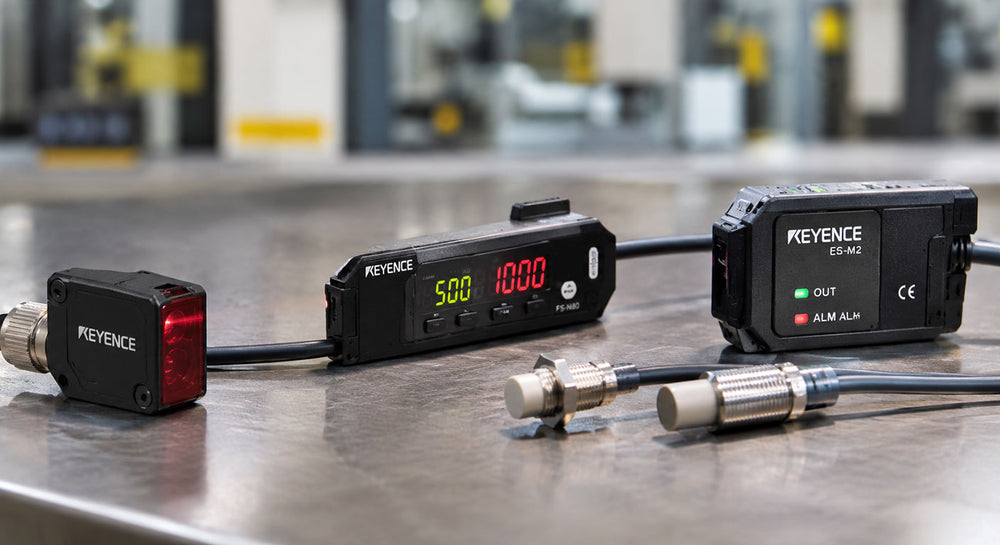
Keyence documents specific pairings that won’t work together. Its ES-M1 and ES-M2 proximity amplifiers, for example, cannot be connected to the EH-422, EH-430, EH-440, or EH-290 sensor heads, even though all of them are Keyence proximity sensor components built around the same amplifier-separate design. That kind of narrow, manufacturer-documented incompatibility shows up elsewhere in Keyence’s amplifier-separate sensor lines too, which makes matching the exact sensor head, amplifier unit, and output type far more important than matching the brand or even the general sensor category.
What information do you need before ordering a replacement Keyence proximity or photoelectric sensor?
Many of Keyence’s proximity and photoelectric sensors use an amplifier-separate design, where a sensor head, such as the EH series for proximity detection, connects to its own amplifier unit rather than housing the electronics together. The amplifier itself is built as either a main unit or an expansion unit, and as either an NPN or a PNP output type.
These aren’t configurable after the fact, so the exact model printed on the unit needs to be confirmed rather than assumed from the series name alone. Keyence’s own documentation lists specific head-and-amplifier combinations that aren’t compatible even within the same general sensor type, which is why matching the full part number, not just the series, determines whether a replacement will actually work.
What information do you need before ordering a replacement Keyence fiber optic sensor?
Keyence’s fiber optic sensors follow an amplifier-separate logic across multiple series. The FS-V30 Series and the broader FS-N Series are digital fiber optic amplifier lines. Keyence now positions the newer FS-N40 Series generation as the recommended "Next Evolution in Fiber Optic Sensing" to the FS-V30 layout. To form a complete system, these digital processing amplifiers pair directly with the modular FU Series Fiber Units, which function as the flexible light paths and specialized fiber heads mounted out in the field.
As with the proximity and photoelectric lines, each FS-V or FS-N amplifier is built as a main unit or an expansion unit with a fixed NPN or PNP output, and an expansion unit typically needs a main unit already installed on the same line to function. Confirming the series, the unit type, and the output polarity on the existing installation is the starting point before ordering a replacement.
How do you confirm a sensor has actually failed before ordering a replacement?
A sensor that reads as faulted is often responding to its environment rather than failing internally. Before replacing a photoelectric or fiber optic amplifier, check the target’s reflectivity and the alignment between the sensor and the target or reflector, since a misaligned or low-reflectivity target produces an unstable signal that looks identical to a failing amplifier.
In an expansion-unit setup, confirm that the main unit powering that line is functioning normally, since a fault on the main unit can appear as a failure on every expansion unit connected to it. If the output remains unstable after alignment, the target material, and the main unit are all confirmed to be good, the amplifier itself is the more likely cause.
Why does this matter for procurement and maintenance teams?
An NPN amplifier wired into a control circuit built for PNP output won’t simply fail to register a signal; it can put the output circuit into a state it wasn’t designed for, which is a different kind of problem than ordinary downtime. Because the output type is fixed at the model level rather than switch-selectable on most of these units, confirming NPN or PNP before ordering helps avoid introducing that risk into a system that was previously wired correctly.
Confirm the sensor head, amplifier type, and output polarity, and finding the part is the easy part that follows. Contact PLC Direct to check current availability and get a quote.
What do PLC Direct’s condition grades mean for Keyence hardware?
PLC Direct supplies industrial automation hardware in three condition grades: Sealed Surplus, Never Used Surplus, and Used/Refurbished, describing packaging and use history only, not safety ratings, calibration, or regulatory certifications. All three carry the same 1-year PLC Direct warranty, issued by PLC Direct as an independent supplier and not an OEM warranty; see the full PLC Direct Condition Grades guide for details on each grade.
