
 1-year warranty

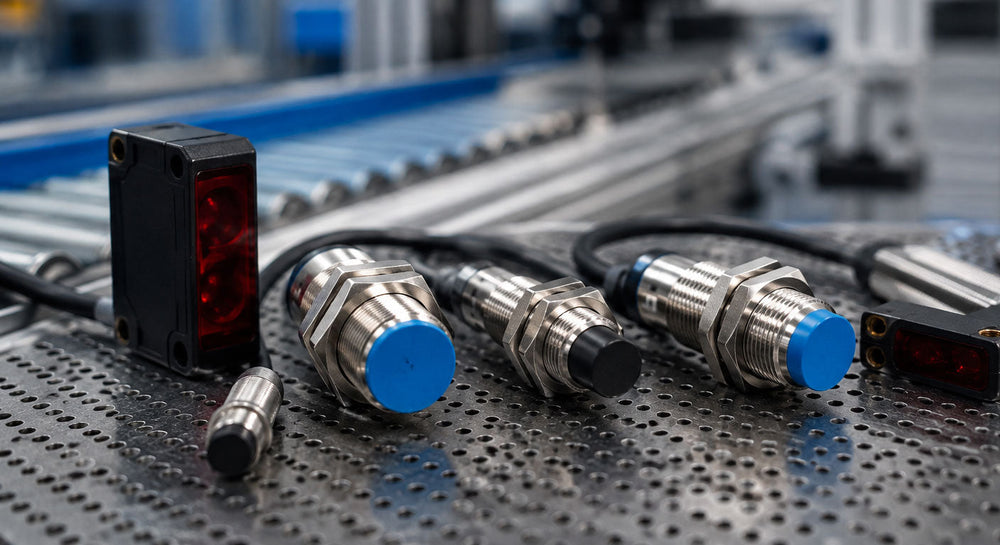
A line that suddenly stops cycling rarely announces the cause right away. Maintenance gets called in, and the first ten minutes are often spent ruling out the PLC, the wiring, and the actuator before anyone checks the small sensor watching for the part to arrive. By the time a proximity sensor is confirmed as the culprit, the line has already been down long enough to matter.
A proximity sensor detects the presence or absence of an object without physical contact, using inductive, capacitive, or magnetic sensing methods depending on the target material. This guide covers what to know when sourcing a proximity sensor or inductive proximity sensor for an existing installation, including how condition grades work and what to verify before ordering.
What Is the Difference Between an Inductive Proximity Sensor and a Photoelectric Sensor?
An inductive proximity sensor detects metal objects using an electromagnetic field, making it a common choice for detecting machine parts, fasteners, or metal components on a line. A photoelectric sensor uses a light beam and a receiver to detect objects made of any material, making it suited to applications where the target is nonmetallic, such as plastic parts, cardboard, or liquid levels.
Choosing between the two typically comes down to the target material and the required detection distance.
-
Inductive proximity sensors detect metal targets only, typically at shorter ranges, often under an inch for standard models.
-
Photoelectric sensors detect nearly any material and can sense over much longer distances, from a few inches to several meters, depending on the sensing mode.
-
Capacitive proximity sensors detect plastics, liquids, and granular materials that inductive sensors miss, though only at short range.
Matching the sensing technology to the target material and mounting distance is the first step in correctly specifying a replacement.
What Should You Check Before Ordering a Replacement Proximity Sensor?
A replacement proximity sensor needs to match the original unit’s sensing range, output type, and housing size so it can be installed without modifying the mounting bracket or rewiring the control panel. Getting these details wrong means the sensor will either not detect the target reliably or not physically fit the existing mount.
Before placing an order, confirm the following details against the sensor being replaced or the equipment drawing.
-
The sensing range matches, since a shorter or longer range than the original changes how close the target needs to be to trigger detection.
-
The output type matches whether the original sensor uses a PNP or NPN transistor output, a normally open or normally closed configuration, or an analog output.
-
The housing style and thread size fit the existing mounting bracket, since barrel-style sensors come in multiple diameters that are not interchangeable.
-
The supply voltage matches the control panel’s available power, since most industrial proximity sensors run on 10 to 30 V DC, but exact ranges vary by model.
Reading these specifications directly from the sensor’s nameplate or datasheet before ordering helps avoid a mismatch that only surfaces after installation.
Sealed Surplus, Never Used Surplus, or Used/Refurbished: Choosing a Condition Grade
Proximity sensors are supplied in three condition grades. Sealed Surplus units come in the original, sealed box, though boxes may show shelf wear, and manufacturing dates vary. Never Used Surplus units have not been used or refurbished and may or may not include original packaging. Used/Refurbished units have been inspected, tested, and restored to working condition, covering both previously used and refurbished sensor hardware.
Which grade fits depends on packaging preference and budget rather than the application itself. Sealed Surplus keeps the unit in its original, unopened factory packaging, which fits well when factory-new appearance matters. Never Used Surplus or Used/Refurbished can be a lower-cost option when packaging condition isn't a priority. The condition grade describes only packaging and use history, not functional reliability or safety performance.
Which Brands Does PLC Direct Carry for Proximity and Photoelectric Sensors?
Many facilities run detection hardware from multiple manufacturers, often depending on when the line was originally built or expanded. As an independent supplier, PLC Direct stocks proximity sensors from Balluff, IFM, Keyence, Omron, Pepperl+Fuchs, Schneider Electric, Sick, and Turck, subject to availability. Photoelectric sensors are stocked from Balluff, IFM, Keyence, Omron, Pepperl+Fuchs, and Sick, subject to availability.
Having multiple brands in stock helps when a facility is standardized on a specific manufacturer’s sensing hardware or needs to match an existing installation exactly, rather than substitute a different brand. PLC Direct supplies proximity sensors and other detection hardware for replacement and maintenance purposes and does not provide system design, programming, or integration services.
Getting the Line Back to Cycling
Whether a proximity sensor has failed outright or is triggering intermittently, indicating it is due for replacement, having the right unit on hand keeps the line moving. Contact PLC Direct to check current availability on proximity and photoelectric sensors and get a quote for your application.
